

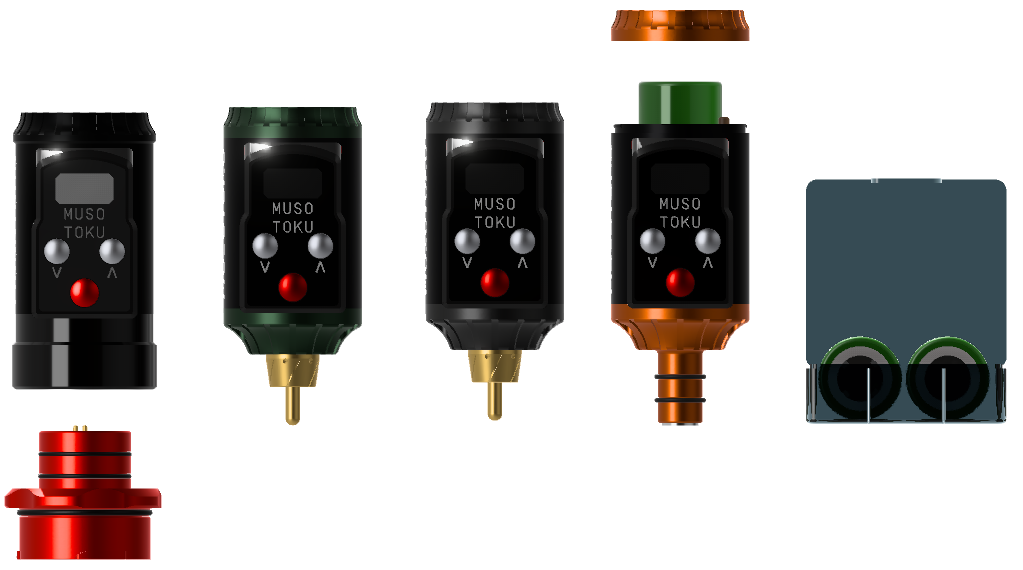
Short answer: choose the ROVER R-1 that matches your machine’s physical connector and operating voltage. Use the RCA Edition for a standard RCA connection, the Cheyenne Edition for a 3.5 mm Cheyenne-style jack, the Dan Kubin Edition for low-voltage Sidewinder setups, and the Universal Edition when you need Mercury M-1 or first-generation Bishop Power Wand compatibility—or one pack that can use optional adapters.
This guide compares the current ROVER R-1 versions so you can identify the right connection before buying. Always confirm the connector and voltage requirements in your tattoo machine’s manual.
ROVER R-1 compatibility at a glance
| ROVER R-1 version | Connection | Best suited to | Output range |
|---|---|---|---|
| Universal | Native Universal interface; adapters available | Mercury M-1, first-generation Bishop Power Wand, FK Irons PowerBolt with included adapter, or RCA/Cheyenne machines with optional adapters | 4–12 V, adjustable in 0.1 V |
| RCA | Standard RCA | Tattoo machines with a standard RCA socket | 5–12 V, adjustable in 0.1 V |
| Cheyenne | 3.5 mm jack | Cheyenne machines using the 3.5 mm connection, including the Cheyenne Thunder | 5–12 V, adjustable in 0.1 V |
| Dan Kubin | RCA; mechanical adapters available for compatible Sidewinders | Dan Kubin Sidewinder machines and artists who need validated low-voltage operation | 2.5–12 V, adjustable in 0.1 V; 2.5–3.9 V validated only for Dan Kubin machines |
How to choose the correct ROVER R-1
1. Identify the connector on your machine
Do not choose by machine shape alone. Check the power socket or the connector named in the manufacturer’s manual:
- Round RCA socket: choose the RCA Edition for the most direct setup.
- 3.5 mm Cheyenne-style jack: choose the Cheyenne Edition.
- Mercury M-1 or first-generation Bishop Power Wand interface: choose the Universal Edition.
- Dan Kubin Sidewinder: choose the Dan Kubin Edition and confirm whether your machine needs a Snap’n Lock mechanical adapter or clip-cord pigtail.
If you work with several connector types, the Universal Edition can be the more flexible option: it includes the FK connector adapter, while RCA and Cheyenne adapters are optional.
2. Check the machine’s operating voltage
The physical connector is only part of the decision. The machine must also operate inside the battery pack’s supported voltage range. Universal covers 4–12 V; the dedicated RCA and Cheyenne versions cover 5–12 V. The Dan Kubin Edition extends down to 2.5 V, but its 2.5–3.9 V range has been designed and validated specifically for Dan Kubin machines.
3. Decide between a direct connection and adapters
A dedicated RCA or Cheyenne model keeps the setup simple when you consistently use one connection. Universal is useful when you switch between compatible machines and want to change the interface with adapters. An adapter changes the physical connection; it does not override the machine’s electrical requirements.
What the four versions share
- Stable output throughout the battery cycle
- Voltage adjustment in 0.1 V increments
- Replaceable flat-top 18350 Li-ion cells
- Compact aluminium construction and OLED display
- Real-time monitoring of the tattoo machine’s power demand
Runtime varies with the machine, voltage, needle configuration and mechanical load. For a practical explanation, see our guide to ROVER R-1 battery duration with Cheyenne tattoo machines.
Common compatibility mistakes to avoid
- Assuming every pen uses the same connector. Similar-looking machines can use RCA, 3.5 mm or a proprietary interface.
- Checking the connector but not the voltage. Both must be compatible.
- Using the Dan Kubin low-voltage range with an unvalidated machine. Operation from 2.5 to 3.9 V is validated only for Dan Kubin machines.
- Expecting an adapter to change voltage requirements. It only provides a compatible physical interface.
- Buying replacement cells without checking the format. ROVER R-1 uses flat-top 18350 Li-ion cells.
For more detail on the 3.5 mm setup, read Is the ROVER R-1 compatible with Cheyenne tattoo machines?
If a compatible battery will not charge, turn on or maintain power under load, follow our tattoo battery troubleshooting guide to isolate the charger, battery, connection and machine.
Frequently asked questions
Which ROVER R-1 should I use with a standard RCA tattoo machine?
Choose the ROVER R-1 RCA Edition for a direct standard RCA connection. If you need to use the same battery pack across multiple connection types, the Universal Edition can work with the optional RCA adapter.
Which ROVER R-1 works with Cheyenne machines?
The Cheyenne Edition is designed for machines with a 3.5 mm connection, including the Cheyenne Thunder. The Universal Edition is another option when fitted with the optional Cheyenne adapter.
Does ROVER R-1 work with the Bishop Power Wand?
The Universal Edition connects natively to first-generation Bishop Power Wand machines. Confirm the connector on newer or different Power Wand configurations before ordering.
Can I use the Dan Kubin Edition with another RCA machine?
The Dan Kubin Edition is intended for Dan Kubin Sidewinders and can support other compatible machines within their specified operating range. Its extended 2.5–3.9 V range is validated only for Dan Kubin machines, so check the other machine’s manual before use.
What batteries does ROVER R-1 use?
Current ROVER R-1 versions use replaceable flat-top 18350 Li-ion cells. Use cells that meet MUSOTOKU’s specifications and follow the supplied charging and transport instructions.
Last reviewed: 21 August 2026. Compatibility details were checked against the current MUSOTOKU product specifications. If your machine or connector is not listed, contact MUSOTOKU before ordering.