

Choose the Machete MK-1 if you normally work with one tattoo machine at a time and want four voltage presets in a simple, proven studio setup. Choose the MK-2 Dual USB-C if you want to keep two machines connected, switch between them without reconnecting cables, or work off the grid using a compatible USB-C laptop power bank.
Both models deliver the same core MUSOTOKU performance: up to 5 A of output, a 2–16 V range in 0.1 V steps, stable power for coil and rotary machines, configurable ON/OFF NITRO jumpstart, three operating modes for the foot switch and automatic power-off. The MK-2 is not the more powerful model. Its main advantages are two independent machine outputs and USB-C power.
MK-1 vs MK-2: the short answer
| Feature | Machete MK-1 | MK-2 Dual USB-C |
|---|---|---|
| Machine outputs | One | Two independent outputs |
| Voltage memories | Four presets for the connected machine | One independent voltage memory for each machine channel |
| Power input | 19 V grounded worldwide adapter | Included universal USB-C laptop-class adapter; 20 V USB PD output and 45 W minimum |
| Portable battery operation | Requires a suitable external AC power solution | Works with a compatible 20 V USB PD laptop power bank rated at 45 W or more |
| Output capability | Up to 5 A; 2–16 V in 0.1 V steps | Up to 5 A; 2–16 V in 0.1 V steps |
| Machine compatibility | Coil and rotary | Coil and rotary |
| NITRO jumpstart | Configurable ON/OFF | Configurable ON/OFF |
| Best starting point for | A single-machine workflow with several saved voltages | Two-machine workflows, fast channel changes and off-the-grid work with a USB-C power bank |
The decision is therefore less about power and more about how many machines you want ready, how you organise voltage settings and how you intend to power the unit.
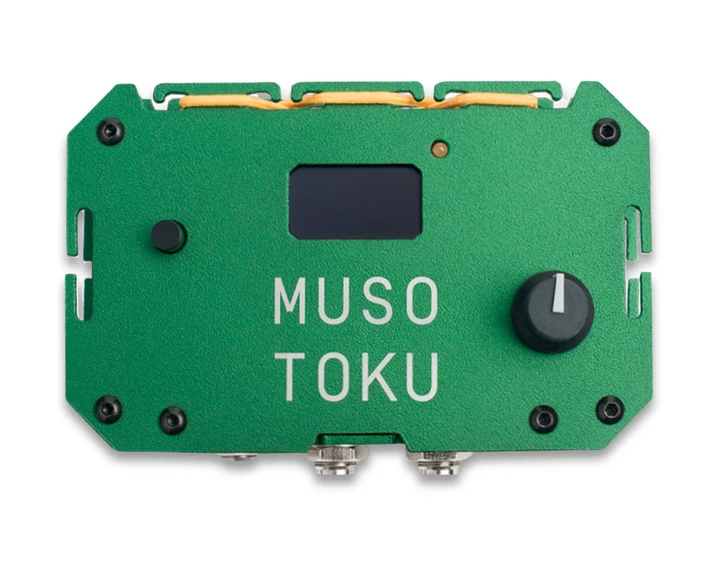
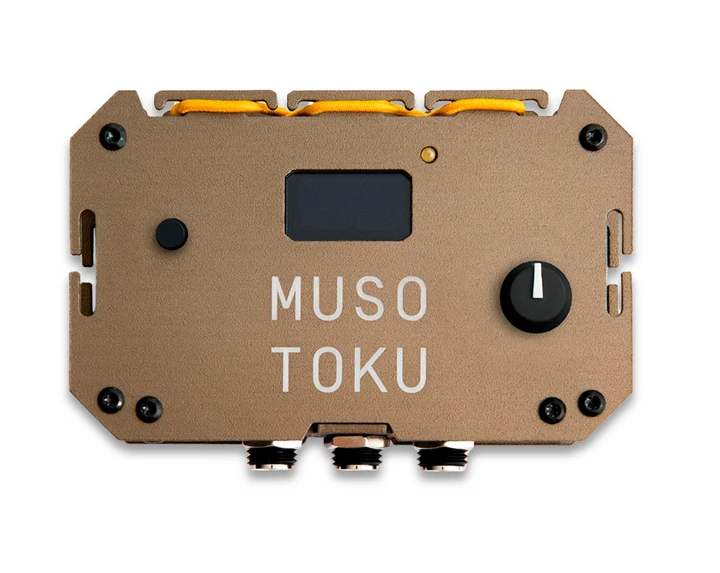
What both tattoo power supplies have in common
The Machete MK-1 and MK-2 are built around the same working principles:
- up to 5 A of stable output for demanding coil and rotary machines;
- 2–16 V adjustment in 0.1 V steps;
- a physical dial for direct voltage control;
- standard, continuous and one-touch foot-switch operation;
- configurable NITRO jumpstart;
- overcurrent protection that stops the output when a short circuit or excessive load is detected;
- automatic power-off after one hour without operation;
- an integrated stopwatch timer;
- a compact aluminium body and a tripod-compatible mounting point.
Neither model changes the voltage range or gives a tattoo machine more power simply because it is newer. When the same machine, cable and operating voltage are used, the practical difference comes from workflow rather than from a higher maximum output.
The main difference: one machine or two
The MK-1 has one machine output. It is designed for artists who connect one machine and change working voltage as the session progresses. Its four memory presets make it easy to store several settings and move between them without turning the dial from scratch each time.
The MK-2 Dual USB-C has two independent machine outputs. Each output stores its own voltage, and an indicator beside the connectors shows which channel is active. Press the front push-button once to switch between machine 1 and machine 2.
This is useful when you want to keep, for example:
- a liner and a shader connected;
- a coil and a rotary machine ready;
- two rotary machines with different cartridges or working voltages;
- a primary machine and a second setup ready for another stage of the tattoo.
Only the selected MK-2 channel is active. The two outputs are not intended to run two machines simultaneously.
Four presets or two independent machine memories?
The models organise memory differently.
The MK-1 provides four voltage presets for one connected machine. It is the more flexible choice if you use a single machine but regularly move among several repeatable voltages during lining, shading or packing.
The MK-2 Dual provides one independent memory for each of its two machine channels. Its priority is not offering a larger preset bank; it is remembering the working voltage of two connected machines so that switching channels does not require readjustment.
Choose according to the action you repeat most often:
- if you change voltage more often than you change machines, the MK-1's four presets may be more useful;
- if you change machines more often than you change the voltage of each machine, the MK-2's two independent channels simplify the session.
Conventional adapter or USB-C power?
The Machete MK-1 uses a grounded 19 V adapter. The supplied adapter accepts worldwide mains input, making the power supply suitable for studios, guest spots and conventions where a reliable wall outlet is available.
The MK-2 includes its own compact universal USB-C power adapter. It comes with interchangeable plugs for the EU, US and UK. For Australia, MUSOTOKU also supplies an additional plug adapter.
The power connection can also be shared with compatible Apple laptop equipment: a USB-C MacBook power adapter can power the MK-2, and the USB-C adapter supplied with the MK-2 can also be used to power or charge a compatible MacBook. This can reduce the number of power adapters you need to carry.
This does not mean that every USB-C charger will work. Chargers intended only for phones or tablets commonly lack either the 20 V USB PD profile or the required 45 W capacity. Use a laptop-class USB-C source and check the output specifications rather than relying on the connector shape alone.
For a step-by-step label check, cable requirements and power-bank auto-off precautions, read How to choose a USB-C power adapter or power bank for the MUSOTOKU MK-2.
The same requirement applies to portable batteries. The MK-2 can run from a suitable USB-C laptop power bank that provides the required output, enabling full-power operation away from the electrical grid.
For artists who work away from mains power, move frequently between stations or want a clean battery-powered convention setup, this is the clearest advantage of the MK-2.
Choose the Machete MK-1 if
- you normally use one machine at a time;
- you want four quickly accessible voltage presets;
- you mainly work in a studio or at locations with dependable mains power;
- you do not need to power the unit from a USB-C laptop battery;
- you prefer the simplest possible cable and channel setup.
The MK-1 remains a strong professional choice. The existence of the MK-2 does not make it obsolete; it solves a different workflow problem.
Choose the MK-2 Dual USB-C if
- you want two tattoo machines connected and ready throughout the session;
- you frequently alternate between a liner and shader, coil and rotary, or two different cartridge setups;
- you want each machine output to remember its own working voltage;
- you need a USB-C power input for travel, conventions or off-grid operation;
- you use compatible laptop power banks and want full power without a wall outlet;
- you want to reuse a compatible laptop power adapter instead of carrying separate chargers.
The MK-2 reduces reconnection and setup changes. Its value is greatest when you will regularly use both machine channels or USB-C power; otherwise, the MK-1 may already cover everything you need.
Common workflow examples
| Working situation | Better starting point | Why |
|---|---|---|
| One machine with several saved voltages | MK-1 | Four presets are available without changing the connected machine |
| Liner and shader kept ready | MK-2 Dual | Both machines remain connected with an independent voltage memory |
| Coil and rotary used in the same session | MK-2 Dual | One press changes the active machine channel |
| Minimal single-machine studio setup | MK-1 | No second output or USB-C battery workflow is required |
| Convention with a reliable wall outlet | Either | Both provide the same 5 A output capability; choose by machine workflow |
| Convention or guest spot without dependable mains access | MK-2 Dual | A compatible laptop power bank can provide the required laptop-class USB-C power |
| One versatile rotary with different techniques | MK-1 | Four presets may be more valuable than a second machine output |
Which one is better for coil machines?
The Machete platform was created with coil machines specifically in mind and is probably one of the best tattoo power supplies on the market for them.
The idea began after seeing old-school artists use powerful 5 A laboratory power supplies in their studios to obtain the performance they wanted from their coil machines. MUSOTOKU used that as the starting point: design a tattoo power supply capable of matching the strength and stability of those laboratory units while adding the controls, protection and form factor required for professional tattooing.
Both the MK-1 and MK-2 are capable of delivering up to 5 A and are designed for coil and rotary tattoo machines. The MK-2 does not provide a higher maximum output than the MK-1.
Choose the MK-2 if you want two machines—such as a liner and shader—connected at the same time. Choose the MK-1 if you work with one coil machine or prefer four preset voltages for one connected setup.
If a coil machine becomes progressively hotter or loses performance, increasing the voltage repeatedly is not a reliable fix. Review machine setup, duty cycle, capacitor condition, polarity, cable condition and power quality. The detailed explanation is available in Why does my tattoo coil machine get hot?.
A practical decision checklist
- Count the machines you genuinely keep in use. Choose the MK-2 for two connected setups, not simply because a second socket may be useful one day.
- Count the voltages you regularly revisit. Four presets favour the MK-1; one remembered voltage per machine favours the MK-2.
- Decide whether portable USB-C power is part of your real workflow. If you will not use a compatible laptop power bank, do not give this feature more weight than the way you work every day.
- Check your power source. The MK-2 requires a 20 V USB PD output providing at least 45 W from a laptop-class adapter or compatible power bank. Phone and tablet chargers are suitable only when their technical label meets those requirements. The MK-1 requires its approved 19 V grounded adapter.
- Choose by workflow, not maximum power. Both models provide the same 5 A output capability and voltage range.
Frequently asked questions
Is the MUSOTOKU MK-2 more powerful than the Machete MK-1?
No. Both can deliver up to 5 A and provide a 2–16 V output range adjustable in 0.1 V steps. The MK-2 adds two independent machine channels and USB-C power; it does not increase the maximum output capability.
Can the MK-2 run two tattoo machines at the same time?
No. Two machines can remain connected, but only the selected channel is active. Each channel is independent and retains its own voltage setup. Press the front push-button once to switch between machine outputs. The two machine channels do not replace the foot-switch connection: the MK-2 also has a separate, independent foot-switch input that controls the active channel.
Can I use any USB-C charger with the MK-2?
No. The MK-2 requires a 20 V USB PD output providing at least 45 W. A phone or tablet charger is suitable only if its technical label independently meets both requirements; most do not. A compatible MacBook USB-C power adapter can power the MK-2, and the adapter supplied with the MK-2 can also be reused with a compatible MacBook.
Can the MK-2 work from a power bank?
Yes, when the USB-C power bank is designed for laptops and can provide a 20 V USB PD output at 45 W or more. Check the battery, the individual USB-C output, the cable and the power bank's idle auto-off behaviour.
How many voltage memories does the MK-1 have?
The MK-1 has four voltage presets for its single machine output. The current preset is updated automatically when its voltage is adjusted.
How many voltage memories does the MK-2 Dual have?
Each of the two machine outputs retains its own voltage setting. The MK-2 is organised around one remembered setup per connected machine rather than the MK-1's four-preset bank.
Do both models work without a foot switch?
Yes. Both support standard foot-switch operation, continuous mode without a foot switch, and one-touch operation in which a brief press toggles the machine on or off.
Do both models work with coil and rotary machines?
Yes. Both are designed for coil and rotary tattoo machines and provide the same maximum output capability. Always remain within the machine manufacturer's operating limits.
Which model is better for conventions?
Either model can work well at a convention. Choose the MK-1 for a straightforward single-machine setup with mains power. The MK-2 has three practical travel advantages: it includes interchangeable EU, US and UK plugs, with an additional adapter supplied for Australia; its USB-C power adapter is smaller; and a compatible laptop and the MK-2 can share the same adapter. Reusing one adapter for both devices can reduce the size and weight of your luggage. A compatible USB-C laptop power bank also allows off-the-grid operation.
Are the different MK-1 colours technically different?
Standard colour and artist editions use the Machete MK-1 platform unless the individual product page states otherwise. Finish, material, availability and included options can differ, so confirm the exact listing before purchase.
Compare the current models
Review current configurations and availability in Shopify: Machete MK-1, MK-2 Dual USB-C and the complete MUSOTOKU power supply collection.
Price, colour, accessory bundles and availability are maintained exclusively in Shopify.