

To power the MUSOTOKU Machete MK-2 Dual USB-C, choose a USB-C Power Delivery source made for laptops that can provide at least 45 W from a single USB-C output at 20 V. A 60 W source is the most common and straightforward choice. Check the specification of the exact port and use a USB-C to USB-C cable rated for 60 W or more. Connector shape, battery capacity and total advertised wattage alone do not confirm compatibility.
The Machete MK-2 Dual USB-C brings the stable power and compact aluminium construction of the MUSOTOKU platform to a more flexible two-machine workflow. It provides two independent machine outputs, a separate voltage memory for each channel, up to 5 A of consistent output and a 2–16 V adjustment range in 0.1 V steps. It works with coil and rotary tattoo machines and includes configurable NITRO jumpstart, three footswitch modes, overcurrent protection, an integrated timer and automatic power-off.
Its USB-C input also allows the MK-2 to operate from either its included wall adapter or a compatible laptop power bank. This makes it possible to work at full performance in the studio, at a convention, during a guest spot or away from the electrical grid.
The important detail is that USB-C describes the connector, not the amount of power available through it. Two chargers can have the same USB-C socket while offering very different voltage and power profiles.
The short compatibility answer
Use this checklist before buying or connecting a third-party adapter or power bank:
| Requirement | What to look for |
|---|---|
| Power standard | USB-C Power Delivery, normally written as USB PD or PD |
| Intended device | Laptop or notebook compatibility |
| USB-C output voltage | A 20 V output profile |
| Power from one port | 45 W or more from the USB-C port used for the MK-2; 60 W is a common standard choice |
| Example of a suitable output | 20 V ⎓ 2.25 A provides 45 W; 20 V ⎓ 3 A provides 60 W |
| Cable | USB-C to USB-C cable rated for 60 W or more |
| Port direction | The selected USB-C connector must operate as an output, not only as an input for recharging the power bank |
The safest option for normal wall-powered use is the USB-C adapter supplied with the MK-2. When choosing a replacement, a second travel adapter or a portable battery, apply every requirement in the table rather than relying on a product title or the presence of a USB-C port.
Why a normal phone or tablet charger may not work
Many USB-C chargers intended for phones and tablets provide lower-voltage profiles or less than 45 W. They may fit the MK-2 physically but still be unable to supply the laptop-class power profile it requires.
Do not select a charger simply because its packaging mentions an iPhone, iPad or Android device. Read its output specification. A source is suitable only if the USB-C output itself supports USB Power Delivery at 20 V and can provide at least 45 W from that port.
Conversely, a compliant 45 W, 65 W, 90 W or 100 W laptop adapter can be suitable. A higher maximum wattage does not force that entire amount of power into the MK-2: with USB Power Delivery, the source and the connected device negotiate a supported power profile.
There is, however, an additional precaution when the source is a power bank. Most power banks automatically switch off their output when they detect that no device is drawing power. We have observed that some very high-output models also use a relatively high minimum-load threshold. When the MK-2 is switched on but is not currently powering a tattoo machine, its consumption can become so low that the power bank decides nothing is connected and shuts down the USB-C output after one or two minutes.
This behaviour does not mean that the power bank lacks sufficient maximum power. It means that its automatic shut-off logic is not well suited to the MK-2's very low idle consumption. Test a high-output power bank with the machine stopped for several minutes before relying on it during a session. If the model offers an always-on or low-current mode, check the manufacturer's instructions for how that mode operates.
How to read the output label
Look for the section marked Output, USB-C Output, Type-C Output or PD Output. A compatible specification may look like this:
Output: 5 V ⎓ 3 A / 9 V ⎓ 3 A / 12 V ⎓ 3 A / 15 V ⎓ 3 A / 20 V ⎓ 3 A
The relevant part is the final profile:
- 20 V × 3 A = 60 W;
- 20 V × 2.25 A = 45 W, which is sufficient for the MK-2;
- the voltage requirement is present;
- the selected port can deliver the required power by itself.
Example 1: read the individual USB-C output
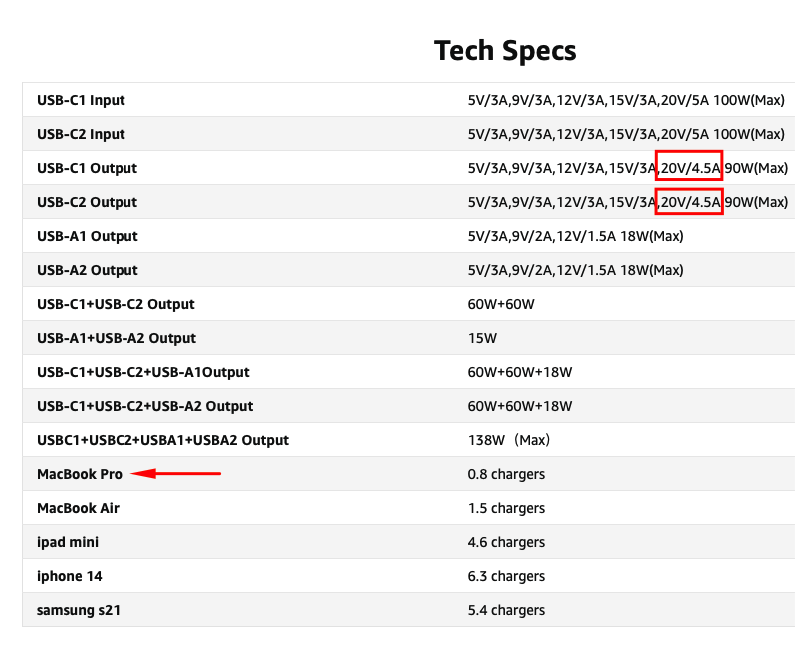
USB-C1 Output and USB-C2 Output. Each one lists 20 V ⎓ 4.5 A, or 90 W, so either USB-C port has more than enough electrical capacity for the MK-2.This example also mentions a MacBook Pro and MacBook Air, which confirms that the product is intended for laptop-class loads. However, the laptop list is only supporting evidence. The decisive information is still the 20 V profile and wattage available from the individual USB-C output.
Do not be distracted by the 138 W total shown elsewhere in the table. Total combined power does not establish what one port can deliver. In this case, the individual-port rows provide that confirmation.
Because this is a high-output power bank, its idle auto-off behaviour should also be tested with the MK-2 switched on and the tattoo machine stopped.
Example 2: distinguish input from output
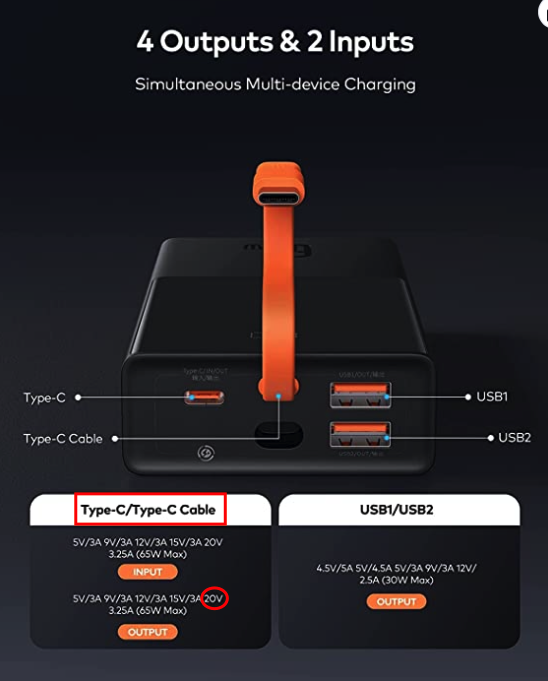
INPUT and OUTPUT specifications for its Type-C connection. The relevant output line includes 20 V ⎓ 3.25 A, or 65 W, making that Type-C output electrically compatible with the MK-2.This distinction matters because some USB-C connectors are used only to recharge the power bank. Finding 20 V under Input is not sufficient: it must also appear under Output for the port or integrated cable that will power the MK-2.
The USB-A outputs in this example reach only 12 V and 30 W. They are not compatible, even though the same power bank has a suitable Type-C output. Always check the specification of the exact connector you intend to use.
The following examples show how to interpret common labels:
| Label or specification | Compatible? | Reason |
|---|---|---|
| USB-C PD, 20 V ⎓ 2.25 A, 45 W | Yes | Meets the minimum MK-2 design requirement |
| USB-C PD, 20 V ⎓ 3 A, 60 W | Yes | Meets the requirement and uses a common standard rating |
| USB-C PD, 20 V ⎓ 3.25 A, 65 W | Yes | Provides a suitable 20 V profile with more than 45 W available |
| USB-C PD, 20 V ⎓ 5 A, 100 W | Yes* | Electrically suitable; if it is a power bank, test its automatic shut-off behaviour at idle |
| USB-C output up to 15 V, even if the battery is large | No | The required 20 V profile is missing |
| 20,000 or 26,800 mAh with an 18 W USB-C output | No | Capacity does not compensate for insufficient output power |
| 100 W total, but only 30 W from the selected USB-C port | No | The rating of the individual port is below 45 W |
How to choose a compatible wall adapter
The MK-2 includes a compact universal USB-C adapter. It is supplied with interchangeable plugs for the EU, US and UK; MUSOTOKU also includes an additional adapter for Australia.
For a third-party wall adapter, confirm all of the following:
- It supports USB Power Delivery.
- Its USB-C output includes a 20 V profile.
- It supplies at least 45 W through the port you will use. A 60 W model is generally easier to find.
- It is compliant with the electrical and safety requirements in the country where it will be connected.
- The USB-C cable is rated for at least 60 W.
A compatible MacBook USB-C adapter rated at 45 W or more and offering a 20 V USB PD output can power the MK-2. The 60 W adapter supplied with the MK-2 can also be repurposed for compatible USB-C laptops, although charging speed will depend on the computer's own power requirements.
This can reduce the number of adapters carried to conventions and guest spots, but always check the rating printed on the exact adapter. Not every MacBook adapter has the same wattage.
How to choose a compatible power bank
A power bank must meet the same electrical requirements as the wall adapter. Search for a model designed to power laptops rather than one marketed only for phones.
Check these five points:
- USB-C PD: the battery must support Power Delivery output;
- 20 V output: the output table must explicitly include 20 V;
- 45 W from one port: not just 45 W or more combined across several connectors; 60 W remains the most common standard choice;
- USB-C output: some power-bank USB-C ports accept charge but do not power an external device;
- laptop compatibility: this is a useful initial filter, but the technical label remains the final test.
If a power bank has several ports, check what happens when more than one device is connected. Some models advertise 65 W or 100 W from a USB-C port only when that port is used alone. Connecting a phone or laptop at the same time may reduce the power available to the MK-2 below 45 W.
For the most predictable setup, give the MK-2 a dedicated USB-C output capable of at least 45 W at 20 V. A 60 W output is a common and convenient choice.
Also test the power bank's idle behaviour. Leave the MK-2 switched on without running a tattoo machine for several minutes, then confirm that the USB-C output remains active. If the power bank shuts down after one or two minutes, its minimum-load detection makes it unreliable for this use even though its voltage and maximum wattage are technically sufficient.
Battery capacity does not determine compatibility
The capacity printed in mAh describes how much energy a battery stores; it does not tell you whether the battery can supply the voltage and power required by the MK-2.
A 26,800 mAh battery with only an 18 W or 30 W output is not a better choice than a smaller battery with a proper 45 W or 60 W, 20 V laptop output. Capacity affects potential runtime only after the power bank has passed the compatibility check.
For comparing expected runtime, watt-hours (Wh) are more useful than mAh, but the real result will still vary with:
- tattoo machine type and tuning;
- working voltage;
- how continuously the machine runs;
- conversion losses in the power bank;
- other devices sharing the battery.
For this reason, a responsible runtime estimate must be based on the complete power-bank specification and the artist's actual setup.
Do not overlook the USB-C cable
The adapter or power bank may be compatible while the cable is not. Use a USB-C to USB-C cable rated for 60 W or more.
Avoid choosing a cable only by appearance. Low-power charging cables, damaged connectors and cables without a clear power rating can prevent the MK-2 from receiving the required power profile or create intermittent operation.
When preparing for travel or a convention, carry a second known-compatible cable. It is a small backup that eliminates one of the easiest points of failure in a portable setup.
A quick pre-purchase check
Before buying a USB-C adapter or power bank, find the manufacturer's detailed output table and answer these questions:
- Does it say USB PD or Power Delivery?
- Is the USB-C connector an output?
- Does that output list 20 V?
- Can that single port provide at least 45 W?
- Will it still provide at least 45 W when other ports are in use?
- Is the included or selected USB-C cable rated for at least 60 W?
- Does the power bank keep its output active when the MK-2 is idle for several minutes?
If any answer is missing from the listing, consult the manufacturer's specification sheet or choose a model that states its output profiles clearly.
Recommended setups
For the studio
Use the adapter supplied with the MK-2 and keep a known-compatible USB-C cable with the workstation.
For conventions and guest spots
Carry the supplied universal adapter, the appropriate plug for the destination and a spare 60 W or higher USB-C cable. A compatible laptop power bank can serve as an independent power option when access to mains power is inconvenient or unreliable.
For working away from the grid
Use a laptop-compatible USB-C PD power bank with a dedicated 20 V output providing at least 45 W. A 60 W model is normally easier to find. Test the complete combination—battery, port, cable and idle auto-off behaviour—before relying on it for a professional session.
Frequently asked questions
Can I use any USB-C charger with the MUSOTOKU MK-2?
No. The connector alone does not confirm compatibility. Use a USB-C Power Delivery adapter that supplies at least 45 W from one port and includes a 20 V output profile. A 60 W adapter is the most common straightforward choice.
Can I use a MacBook charger with the MK-2?
Yes, when the exact adapter supports USB Power Delivery, provides a 20 V output and is rated at 45 W or more. Check the label because MacBook adapters are available in different wattages.
Can I use the MK-2 adapter with my laptop?
It can power or charge a compatible USB-C laptop that accepts USB Power Delivery within the adapter's capabilities. A computer that normally uses a higher-wattage supply may charge more slowly.
Can I use an iPhone, iPad or Android USB-C charger?
Not merely because it has a USB-C connector. Chargers intended only for phones or tablets commonly lack either the 20 V output or the required 45 W capacity. Use one only if its technical label independently meets all MK-2 requirements.
Is a 65 W or 100 W USB-C adapter safe to use?
Yes, provided it is a compliant USB Power Delivery source with a 20 V profile and you use an appropriate USB-C cable. The wattage printed on the adapter is its maximum available capacity, not power that is forced into the MK-2. If the source is a high-output power bank, also test that its automatic shut-off does not disable the output when the MK-2 is idle.
Will a 45 W laptop power bank work?
Yes. A power bank capable of delivering 45 W at 20 V from the selected USB-C output is sufficient for the MK-2. The reason we normally mention 60 W is practical rather than electrical: 60 W laptop-class adapters and power banks are more common standard products.
Is a larger mAh rating always better?
No. Capacity can extend runtime, but it does not establish compatibility. Confirm USB PD, 20 V and at least 45 W from one USB-C output first.
Can I connect another device to the power bank at the same time?
Only if the power bank continues to reserve at least 45 W for the MK-2 port. Many multiport models reduce the output of individual ports when power is shared. A dedicated port is the safer working configuration.
What should I check if the MK-2 does not power on from a power bank?
Confirm that you are using an output-capable USB-C port, disconnect other devices, verify the 20 V and minimum 45 W specifications, try a known-compatible 60 W or higher cable and make sure the battery has sufficient charge. If the MK-2 initially powers on but disconnects after one or two minutes without running a machine, the power bank's minimum-load auto-off is the likely cause. Finally, test the MK-2 with its supplied wall adapter to isolate whether the issue comes from the power bank, cable or power supply.
Learn more about the MK-2
Review the current MUSOTOKU Machete MK-2 Dual USB-C, compare the Machete MK-1 and MK-2, or download the current MK-2 user manual.
Price, colour, accessory bundles and availability are maintained exclusively in Shopify.